Saltar al contenido
FXD|STUDIO Documentación sobre Pipeline y Producción

Pipeline

22
  • 1. Requisitos de Software y Hardware
  • 2. Instalación del Pipeline en Windows
  • 3. Instalación del Pipeline en MacOS
  • 4. Actualizar el Pipeline
  • Houdini Pipeline Guia de inicio
    • 1. Introducción
    • 2. Iniciar el Pipeline por primera vez en Houdini
    • 3. Inicializar tu primer plano usando Setup Task
    • 4. Usar Escene Assembler para construir la escena en Houdini
    • 5. Preguntas Frecuentes
    • 6.Buenas Practicas cuando trabajamos en un Pipeline
    • Houdini Pipeline ShelfTools
      • Login
      • Setup Task
      • Scene Assembler
      • Frame Range
      • Increase Version
      • Flipbook Review Publisher
      • Flipbook Gallery
      • Instance Libraries
      • Publish Task ROP
      • Update Sublayer Assets
  • Maya
    • Próximamente
  • Nuke
    • Próximamente

Producción

9
  • Producción en los VFX
  • Kitsu
    • Introducción
    • Initial Setup and Profile Customization
    • Managing Your Assignments
    • Como enviar una tarea para revisión
    • Conectar Kitsu con Discord
  • Dailies
    • Introducción
    • Enviar un plano para Revisión (Dailies)
    • Sesiones de Revisión (Dailies)

Guia de Inicio

1
  • Empieza por aqui
View Categories
  • FXD|STUDIO Documentación
  • Producción
  • Kitsu
  • Managing Your Assignments

Managing Your Assignments

Germán De Benito

< 1 min read

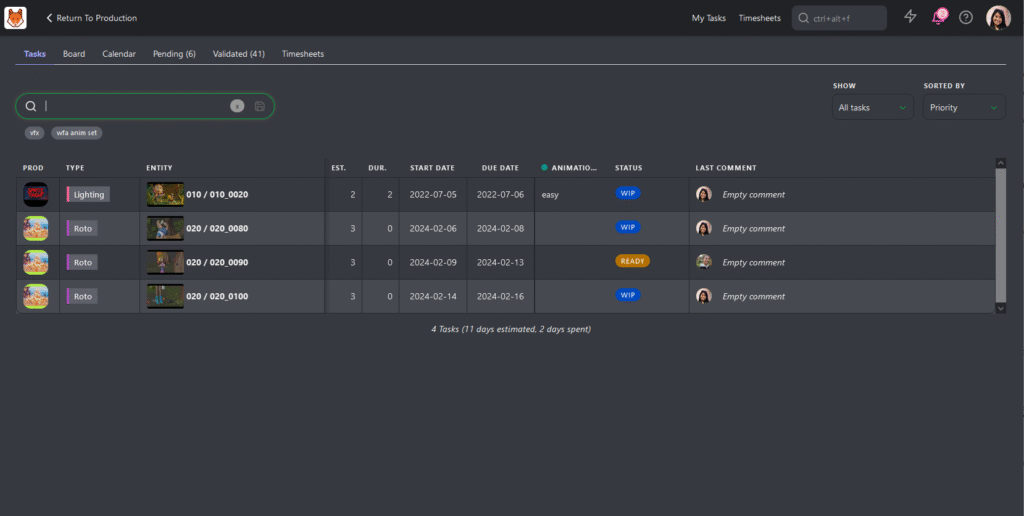
Your My Tasks page is your main hub for assignments and opens automatically upon login. Here you can see a list of tasks you are assigned along with some key information.

Key Information Available: #

  • Production: The project your task is associated with.
  • Entity: The specific asset or shot assigned to you.
  • Estimates & Duration: Time-related information for your tasks.
  • Due Date: The deadline for completing your task.
  • Status and Priority: Key details to understand task urgency.

Additional Features:

  • Under the Show dropdown, you can choose to display All Tasks or focus on those Due This Week.
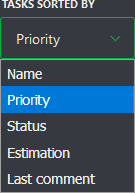
  • Under the Sorted By dropdown, you can sort tasks by Name, Priority, Status, Estimation, or Last Comment.
  • Use these filters to narrow down your list of tasks, or use the search box to find a specific task.


You can access My Tasks via:

  • The shortcut at the top of the screen.
  • The User section of the main menu under MY TASKS.
  • Clicking the Kitsu logo. 

#

Initial Setup and Profile CustomizationComo enviar una tarea para revisión
Table of Contents
  • Key Information Available:

Was it helpful ?

  • Happy
  • Normal
  • Sad
@2025 FXDailies|STUDIO documentación sobre Pipeline y Producción